Originally posted on IBM Developer blog “Exploring PureApplication System, Software Service and more” by Hendrik van Run on 14 March 2016 (5705 visits)
For those of you who are working with some of the IBM Rational test products, IBM has recently released the following products as a pattern for PureApplication. The Knowledge Center provides more details regarding these patterns here. I am including the actual IBM Passport Advantage part numbers here for convenience.
- IBM Rational Integration Tester Pattern 1.0 (CN937ML)
- IBM Rational Performance Test Server Pattern 1.0 (CN936ML)
- IBM Rational Test Virtualization Server Pattern 1.0 (CN938ML)
You can use the following CLI script to quickly import these patterns. Note that there is no need to accept a license for the pattern type com.ibm.rational.rlks.ptype-1.0.0.0.tgz (the license for this pattern type is covered through the licenses of the other pattern types).
newpattern = deployer.patterntypes.create("/repository/Rational/com.ibm.rational.rit.ptype-1.0.0.0.tgz")
newpattern[0].acceptLicense()
newpattern[0].enable()
newpattern = deployer.patterntypes.create("/repository/Rational/com.ibm.rational.rpts.ptype-1.0.0.0.tgz")
newpattern[0].acceptLicense()
newpattern[0].enable()
newpattern = deployer.patterntypes.create("/repository/Rational/com.ibm.rational.rlks.ptype-1.0.0.0.tgz")
newpattern[0].enable()
newpattern = deployer.patterntypes.create("/repository/Rational/com.ibm.rational.rtvs.ptype-1.0.0.0.tgz")
newpattern[0].acceptLicense()
newpattern[0].enable()
Note that you will need to download the actual software separately through IBM Passport Advantage and upload this to the IBM Installation Manager repository. The aforementioned patterns rely on a set of IBM Rational product binaries to be present in the IBM Installation Manager (IIM) repository. The Knowledge Center details what part numbers to download from IBM Passport Advantage here, however at the time of writing some of these part numbers were still incorrect. Make sure to download the following:

- IBM Rational License Key Server V8.1.4 for Linux x86 Multilingual (CIPQ0ML)
- IBM Rational License Key Server Administration and Reporting Tool V8.1.4 Part 1 Multiplatform Multilingual (CIPT1ML)
- IBM Rational License Key Server Administration and Reporting Tool V8.1.4 Part 2 Multiplatform Multilingual (CIPT2ML)
- IBM Rational Integration Tester Agent V8.7.1 Multiplatform Multilingual (CN7C1ML)
- IBM Rational Integration Test Control Panel 8.7.1 Multiplatform Multilingual (CN7BQML)
- IBM Rational Integration Tester 8.7.1 Multiplatform Multilingual (CN7BPML)
By default PureApplication used a built-in IIM repository. The example below shows how to quickly import the IBM Rational product binaries into this IIM repository.
deployer.imrepositories.createCategory('Rational')
deployer.imrepositories.uploadPackageFromLocal('Rational','RLKS_8.1.4_FOR_LINUX_X86_ML.zip')
deployer.imrepositories.uploadPackageFromLocal('Rational','RLKS_ADM_AND_REPTOOL8.1.4PART1_MPML.zip')
deployer.imrepositories.uploadPackageFromLocal('Rational','RLKS_ADM_AND_REPTOOL8.1.4PART2_MPML.zip')
deployer.imrepositories.uploadPackageFromLocal('Rational','IBM_RIT_V8.7.1_EMG.zip')
deployer.imrepositories.uploadPackageFromLocal('Rational','RIT_AGENT_8.7.1_EMG.zip')
deployer.imrepositories.uploadPackageFromLocal('Rational','RIT_CONTROL_PANEL_8.7.1_EMG.zip')
With the software uploaded to the IIM repository, you are now ready to deploy the following Virtual System Patterns.
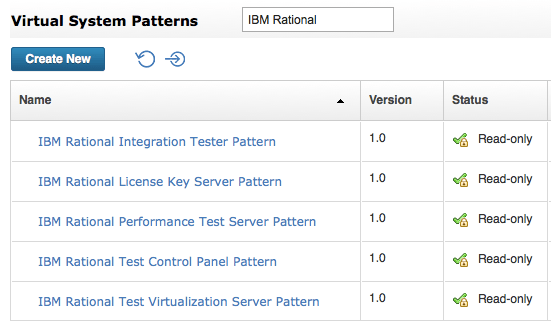
However before you proceed, note that these Rational products have two licensing modes: Processor Value Unit (PVU) based and using the Rational License Key Server (RKLS). Using the PVU licensing mode is straightforward, but if you are using the RLKS mode you need to make sure that you have an existing RLKS setup before you can proceed with a deployment of these Virtual System Patterns. The “IBM Rational License Key Server” Virtual System Pattern can help accelerate the setup of RLKS. You must specify whether to use the PVU or RLKS licensing model through the parameter “Agent Mode” of the Software Component of the various Virtual System Patterns.

When you have RLKS setup, you should deploy the IBM Shared Service for Rational License Key Server as shown below. This will ensure that the license agents will automatically connect to RLKS for the IBM Rational Integration Tester, IBM Rational Virtualization Server and IBM Rational Performance Tester Virtual System Patterns.

 IBM Cloud Pak System