Originally posted on IBM Developer blog “Exploring PureApplication System, Software Service and more” by Hendrik van Run on 21 December 2015 (8149 visits)
IBM released version 1.2.3.0 of the DB2 with BLU Acceleration Pattern on 4th December 2015. Although previous versions of this pattern type were made available through IBM Fix Central, this latest version of the pattern can also be obtained through IBM Passport Advantage.
Update: Make sure to review the Frequently Asked Questions here as well, they provide additional useful information for this pattern.
Downloading from IBM Passport Advantage
PureApplication System clients should automatically be entitled to this, PureApplication Service and PureApplication Software clients require a separate license agreement to be in place. And on that subject, it is worth spelling out that the DB2 with BLU Acceleration Pattern actually installs and configures DB2 10.5 Advanced Workgroup Server Edition (so that is what your license needs to cover). For reference, this developerWorks article very clearly describes the different DB2 licences that exist. Here is the exact description and part number in IBM Passport Advantage for the actual 1.2.3.0 version of the pattern:
IBM DB2 with BLU Acceleration Pattern V1.2.3 Multiplatform Multilingual (CN86WML)
Installing the new pattern type
Once downloaded, you can simply run the commands below from the Pure CLI to import the new pattern type:
>>> newpattern = deployer.patterntypes.create("/repository/BAP_1.2.3.tgz")
>>> newpattern[0].acceptLicense()
{'status': 'accepted'}
>>> newpattern[0].enable()
{'status': 'avail'}
For sake of completeness, this pattern is supported on both Intel and POWER implementations of PureApplication System and PureApplication Software (and on Intel PureApplication Service). Note that we support both RHEL 6.6 and 7.1 (Intel) as well as AIX 6.1 and 7.1 (POWER).
Specify desired DB2 Fix Pack level
The first major change in this new version is the ability to specify the exact DB2 Fix Pack level within the Virtual System Pattern or at deployment time. Previously the Fixpack level was determined by the version of the pattern type that was installed and enabled in the catalog. As shown below, the DB2 software component now offers a selection of DB2 10.5 Fixpack 4, 5 or 6.
Note however that the 1.2.3.0 pattern type only contains the Fix Pack 6 binaries. The entries for Fix Pack 5 and Fix Pack 4 correspond to version 1.2.2.2 and 1.2.1.0 of the pattern type respectively. So if you would like to use Fix Packs 4, 5 and 6 you must have pattern types 1.2.1.0, 1.2.2.2 and 1.2.3.0 installed!
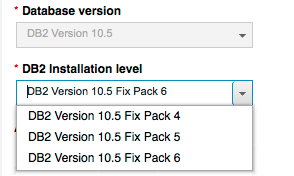
Finally, there is now an option to install a Fix Pack at deployment time as well. For example, when DB2 10.5 Fix Pack 7 ships you could simply deploy DB2 10.5 Fix Pack 6 and automatically apply Fix Pack 7 at deployment time (instead of applying this after deployment). I will add some more details about this here shortly.
Configure a Virtual IP Address for a DB2 HADR database
For some time we have been able to install and configure a DB2 database with HADR configured through a Virtual System Pattern using the DB2 software component and script packages. However we always had to rely on DB2 Automatic Client Re-routing (ACR) in order to leverage the additional increase in resilience delivered by HADR. In other words, each DB2 cilent must “know” about the hostname/IP address of both the primary and standby DB2 VM. The new pattern type introduces the ability to automatically configure and setup a Virtual IP Address (VIP) that can act as a single end point for the DB2 HADR database. In other words, a DB2 client only needs to be configured with the VIP and no longer requires knowledge of the individual primary and standby hostnames/IP addresses. The Virtual System Pattern Default DB2 OLTP Pattern with HADR and VIP for Linux provides a good starting point for using DB2 HADR with a VIP.

When examining the aforementioned Virtual System Pattern in more detail, you will notice that there is a new add-on DB2 VIP Linux add NIC used to assign an additional IP address to the Virtual System Instance at deployment time. This refers back to the name of the DB2 database that is to be configured with HADR. Note that the use of an add-on here is required in order to obtain an additional IP address from the IP group at deployment time.

Once deployed, the VIP from the DB2 HADR Virtual System Instance can be obtained from the stdout of the add-on DB2 VIP Linux add NIC. Note that this was from a deployment on PureApplication System, where eth0 is assigned to the cloud management network, eth1 to the data network and eth2 is used as second virtual network interface on the same data network.
*** searching for NIC with MAC address 00:50:56:ae:39:60
*** It is Red Hat Enterprise Linux Server release 7
*** iface eth2 has MAC address 00:50:56:ae:39:60
*** INTF=eth2
*** provided address 172.18.173.4 is of type IPv4
*** configuring eth2 with IP address 172.18.173.4/255.255.255.0
Adding New IP details to /etc/db2vip.conf
Database hadrdb will be configured with Virtual IP:
172.18.173.4
*** Not activating eth2
A final note on the implementation of DB2 HADR through the DB2 BLU Acceleration Pattern on PureApplication. IBM Tivoli System Automation (TSA) software is used to assign the role of primary and standby to the DB2 databases on both VMs. Some clients wonder what is used as the tiebreaker for TSA, as this is currently not documented in the IBM Knowledge Center. At deployment time, the pattern will obtain the default gateway of the IP group used for the data network (eth1 on PureApplication System) and this is configured as the tiebreaker. Ping requests are sent to the default gateway at regular internals, so the implication of this is that the default gateway and external network must allow for ICMP traffic!
 IBM Cloud Pak System